 AirPower
Back Up Shopify Product Data with Airtable
Back up Shopify product data by duplicating the Airtable base your sync fills. Keep dated copies of titles, prices, and variants, and restore them anytime.
Shopify doesn’t keep earlier versions of product data. Once a product, a variant, or a field value is deleted or overwritten in the admin, Shopify can’t bring back what was there before.
Bulk edits, app changes, and catalog rebuilds change many products at once. One wrong change can overwrite titles, descriptions, or prices across the catalog, or remove products entirely.
AirPower keeps your Shopify product data in an Airtable base. A copy of that base is a dated snapshot of your catalog that you can restore from later.
Before you start
Back up once your Shopify to Airtable sync has brought in your products. To copy every product from Shopify again first, download Products. See Download Shopify Data to Airtable on Demand.
Make a backup
- In Airtable, open the base your sync uses
- Click the base name at the top left
- Click ⋯
- Click Duplicate base
- Name the copy with today’s date
- Keep Duplicate records switched on
- Click Duplicate base
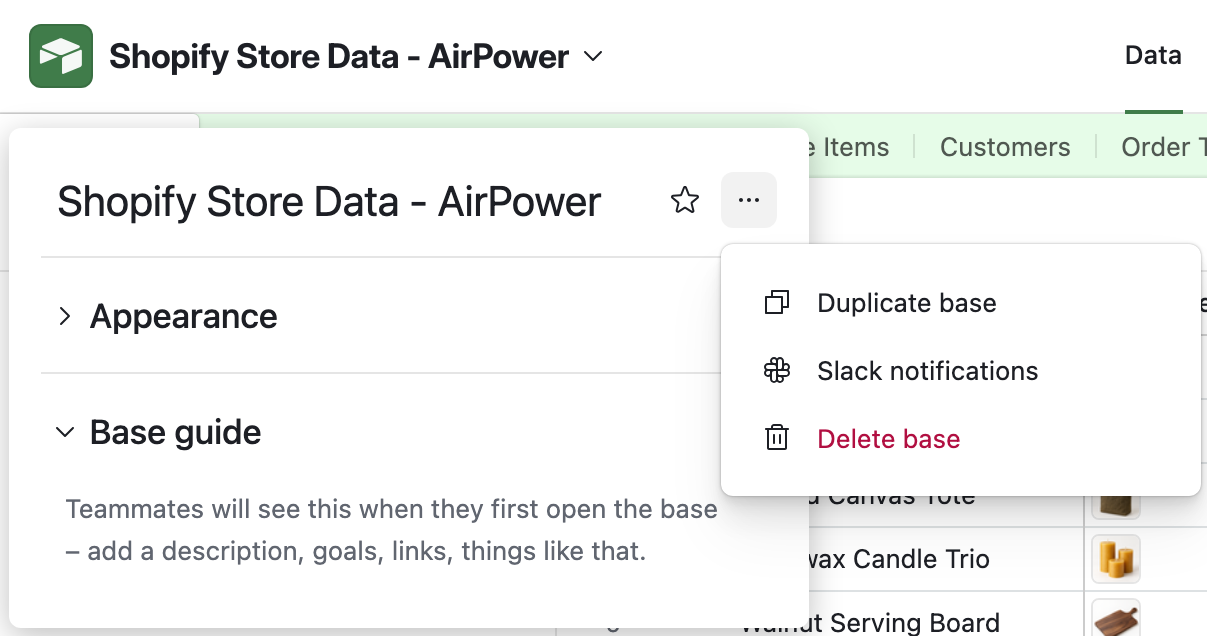
The copy isn’t connected to your syncs. They keep writing to the original base, so the copy stays as it was on the day you made it.
Restore from a backup
Restoring copies values from the backup into the base your syncs use. An Airtable to Shopify sync then sends them to Shopify.
Values that were overwritten
Paste the old values into the same rows of your synced base. Keep each row’s Shopify ID, so the sync updates the existing product.
Products that were deleted
Paste the product’s row, and its variant rows if variants have their own table, as new rows with an empty Shopify ID. The sync creates the product again with a new Shopify ID. A row that keeps the deleted product’s ID gets an error on the Errors tab instead.
Paste only the rows and columns you want back. Pasting a whole table replaces newer values with the backup’s older ones, and the sync sends those to Shopify too.
Once the values are in place, send them to Shopify:
- On the dashboard, find your Airtable to Shopify sync
- Click Sync now
The sync sends the fields set to Send from Airtable on its page. See Update Shopify from Airtable: Send Bulk Edits to Your Store.
What you’ll see after restoring
After the run, the restored values show on the products in the Shopify admin. Recreated products get new Shopify IDs in their rows. Anything Shopify rejected is listed on the sync’s Errors tab.
Related pages
Still stuck?
Email the team and tell us which store and which Airtable base you're working with.