Shopify metaobjects let you store structured custom data — from size guides and ingredients to store locations, retailer data, ratings, or any reusable content. With AirPower, you can sync this data between Shopify and Airtable, giving you a clean, tabular interface to view, edit, and create metaobject entries in bulk.
This guide walks you through:
- Syncing Shopify metaobjects to Airtable
- Editing and updating metaobject values in Airtable
- Syncing changes back to Shopify
- Creating new metaobject instances directly from Airtable
AirPower handles the heavy lifting — generating the Airtable tables, managing field mappings, and keeping Shopify and Airtable aligned.
To get started, you’ll use a Shopify → Airtable sync profile. If you already sync other Shopify data (like Products or Orders), you can simply extend that profile.
- Open your existing Shopify → Airtable sync profile or create a new one
- Scroll down to the Metaobjects section. AirPower automatically detects each of your Shopify metaobject types and lists them.
- Select the metaobject type you want to sync.
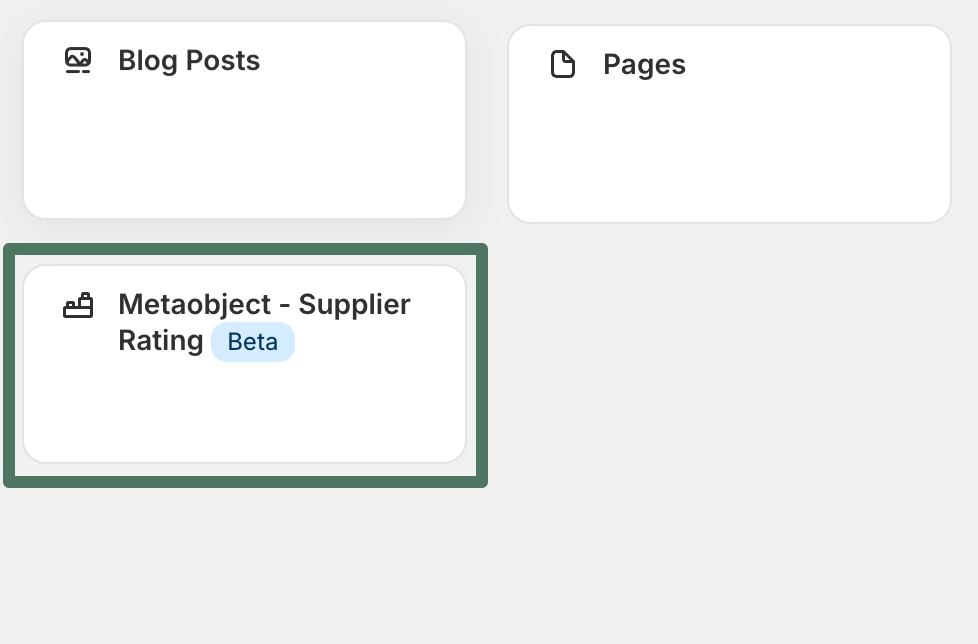
Choose whether to sync into an existing table or create a new one
For each metaobject type, AirPower gives you two options:
- Use an existing Airtable table, or
- Create the default table generated by AirPower
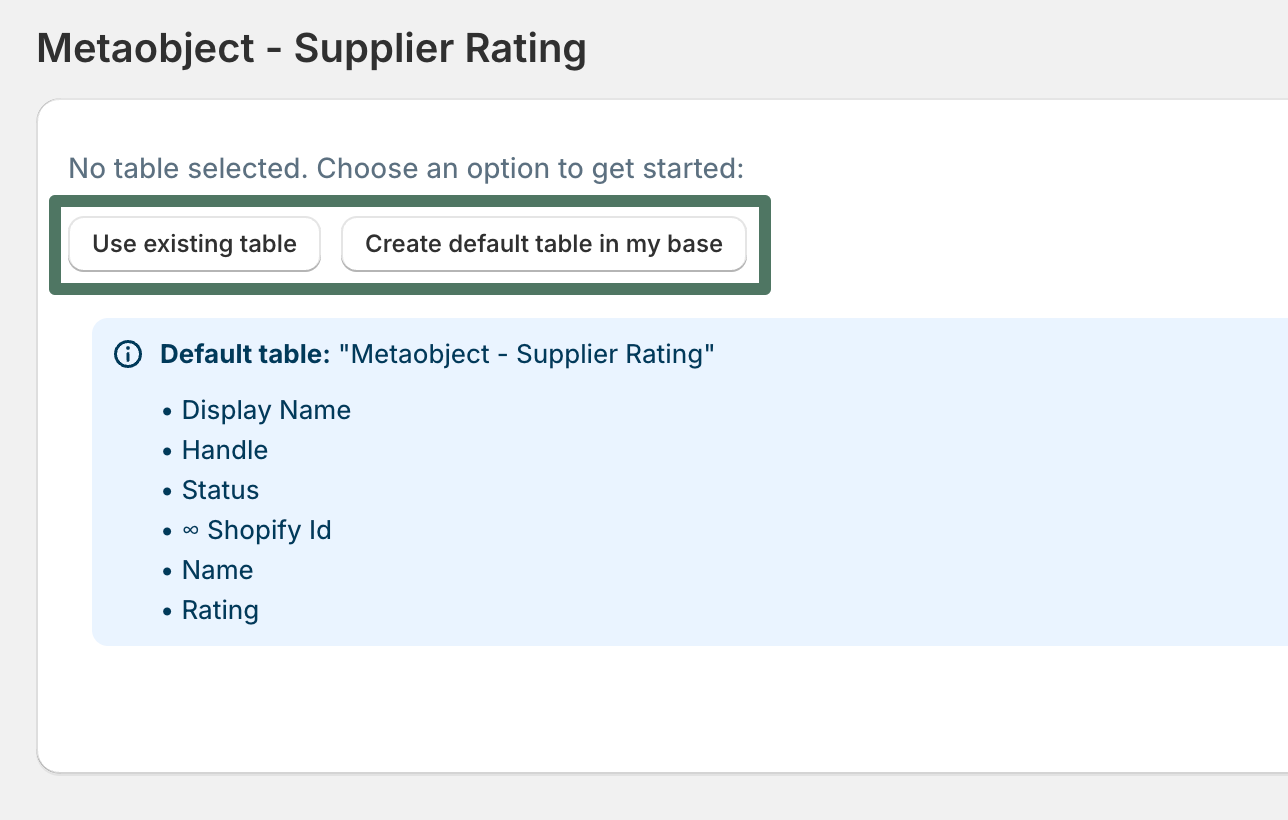
If this is your first time syncing a given metaobject, choose Create default table. AirPower will:
- Create a new Airtable table named after the metaobject type
- Add a column for every metaobject field — both standard Shopify metaobject fields and your custom fields
- Link the sync profile to that new table
Save your sync profile and let AirPower populate the table
After saving the profile:
- AirPower automatically begins populating the table with your existing Shopify metaobject instances.
- Each row represents one metaobject instance.
- Each column represents a field from the metaobject definition.
Once populated, you can now edit this data in Airtable.
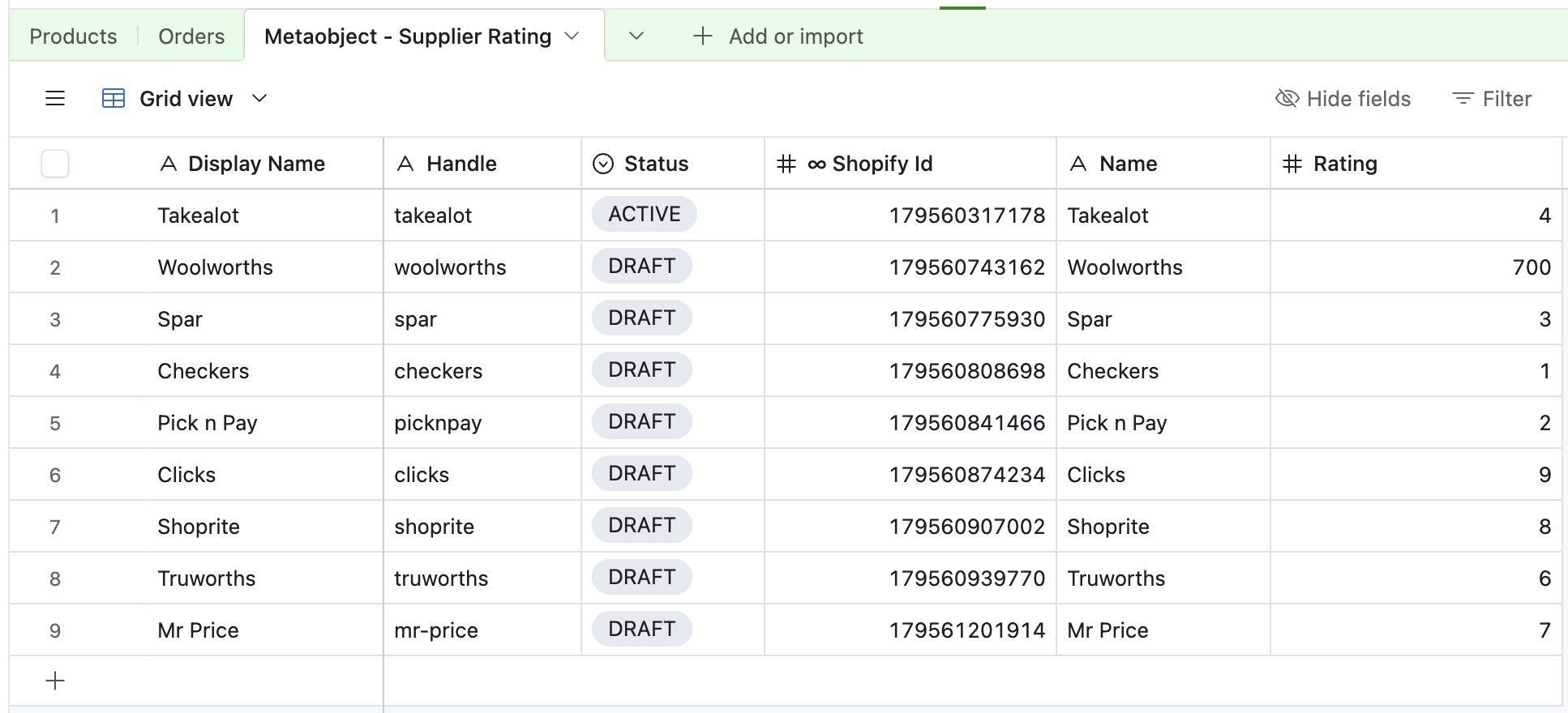
Automatic updates from Shopify to Airtable
When working with Shopify → Airtable sync profiles:
- AirPower automatically populates your metaobject tables.
- Newly created metaobject instances in Shopify will appear in Airtable automatically.
If you update a metaobject directly in Shopify, you’ll see the update reflected in Airtable shortly.
To push your Airtable changes into Shopify, you’ll need an Airtable → Shopify sync profile.
- Open an existing Airtable → Shopify sync profile or create a new one.
- Find the Metaobjects section.
- Select the metaobject type you want to sync.
- Choose the existing table created earlier.
- Map the metaobject fields you want to sync.
AirPower shows:
- Standard Shopify metaobject fields (e.g.,
id, type, timestamps)
- Custom metaobject fields you defined in Shopify
Select the fields you’re editing and want to sync.
Trigger the Airtable → Shopify sync
Once the mappings are saved:
- Go to your AirPower dashboard.
- Start an Airtable → Shopify sync.
AirPower will read each row in the table and update the corresponding metaobject instance in Shopify. After the sync completes, your Shopify data will reflect your Airtable changes.
You can also create new metaobject entries directly in Airtable.
- Add a new row in your Airtable metaobject table.
- Fill in the fields — anything required in Shopify must be filled. Leave the Shopify ID column blank.
- Return to AirPower and run an Airtable → Shopify sync.
When the sync completes:
- A new Shopify metaobject instance is created.
- Shopify assigns it an ID.
- AirPower detects this and updates the Airtable record automatically.
Summary
With AirPower, syncing Shopify metaobjects between Shopify and Airtable is simple and powerful:
- Shopify → Airtable sync creates clean, structured tables with all fields.
- Airtable → Shopify sync lets you update fields, modify content in bulk, and even create new metaobject instances.
- All changes are managed through your AirPower sync profiles — no coding or manual API work required.
This workflow gives you full, spreadsheet-style control over your structured Shopify content.
If you want to manage metaobjects at scale — AirPower makes it effortless.